

Why the Best Thermostat Settings for Hot Climates Matter More Than You Think
The best thermostat settings for hot climates can make a real difference in both your comfort and your monthly energy bill. Here’s a quick reference before we dive deeper:
| Situation | Recommended Setting |
|---|---|
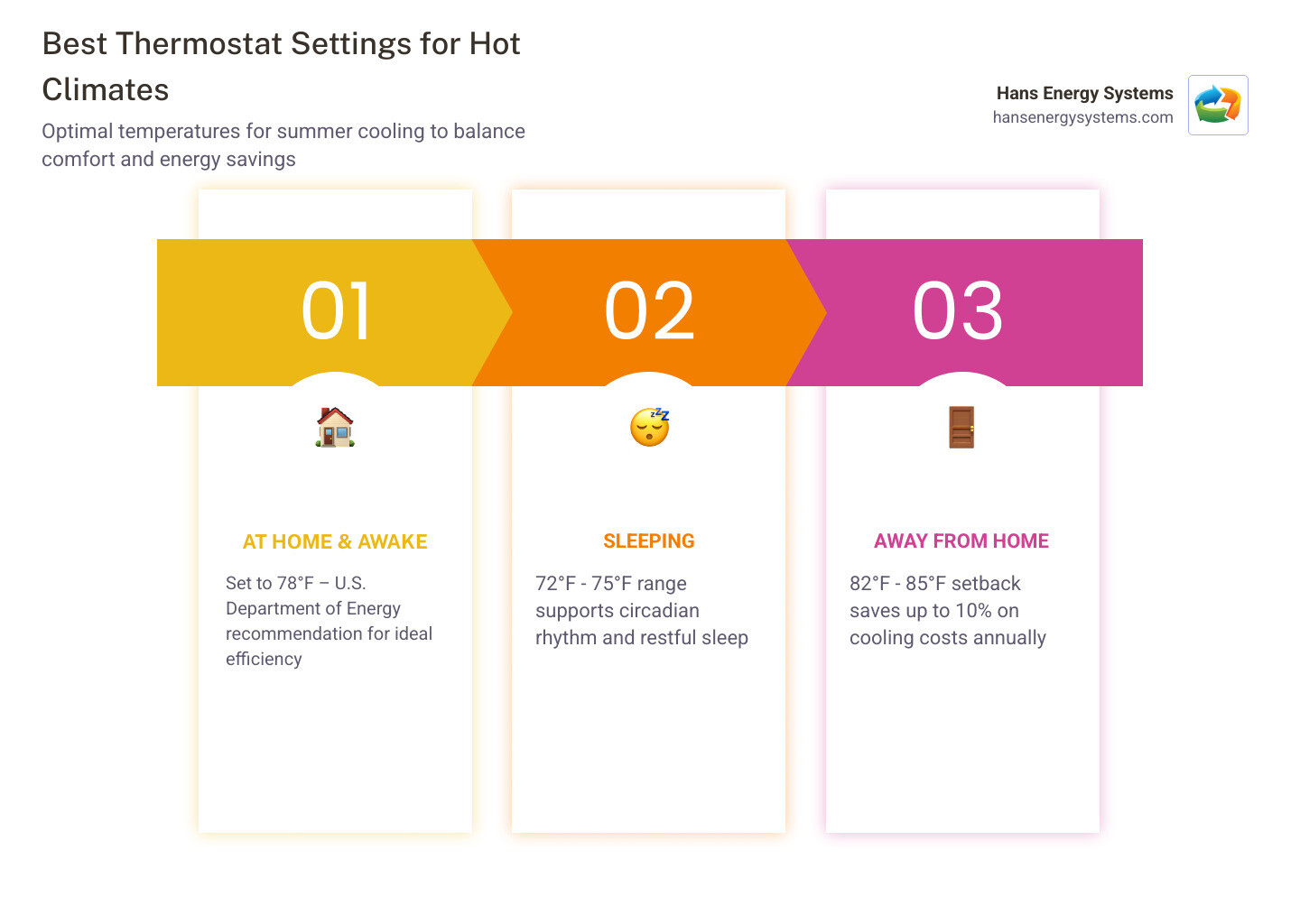
| At home and awake | 78°F |
| Sleeping | 72°F – 75°F |
| Away from home | 82°F – 85°F |
| Vacation / extended absence | 85°F – 88°F |
| Pets home alone | 78°F – 80°F |
Living in a place like San Diego, you already know how quickly a warm afternoon can turn into an uncomfortable evening indoors. Summer heat waves are no joke — and when the AC is working overtime, so is your electricity meter.
The U.S. Department of Energy recommends 78°F as the sweet spot for summer cooling. It balances comfort with efficiency. Every degree you drop below that adds roughly 3% to 5% to your cooling costs. Set it to 72°F instead of 78°F, and you could be paying significantly more for the same four walls.
The good news? Small, informed changes to how you use your thermostat can cut your cooling costs by up to 10% or more — without sacrificing comfort.
Finding the Best Thermostat Settings for Hot Climates
Finding the “magic number” for your home isn’t just about following a guide; it’s about understanding how your home interacts with the environment. As we move through May 2026, the technology in our homes is smarter than ever, but the physics of cooling remains the same.
The 78°F recommendation from the U.S. Department of Energy is often met with skepticism, but it is backed by solid data. For every degree you set your thermostat above 72°F, you can save up to 3% on your cooling costs. In our local area, where San Diego Hvac Services/ are essential during peak summer, those percentages add up to real dollars.
One critical concept we often share with our neighbors in Poway and Rancho Bernardo is the “20-degree rule.” Most air conditioning systems are designed to lower the indoor temperature by about 20 degrees compared to the outside air. If it’s a blistering 105°F in El Cajon, asking your AC to hit 68°F is asking for a mechanical breakdown. Aiming for 78°F keeps the differential manageable and your system healthy.
Balancing Comfort and Efficiency
We know that 78°F can feel a bit warm if you’re used to a chilly 70°F. The trick is to make incremental adjustments. Don’t jump six degrees in one afternoon. Instead, try shifting the dial by 1 or 2 degrees every few days. This allows your body to acclimate to the new “normal” without a shock to the system.
You should also be mindful of heat-generating appliances. Running the dishwasher, oven, or clothes dryer during the hottest part of the day can raise your indoor temperature by up to 10 degrees. By shifting these chores to after 8 PM, you make it much easier for your thermostat to maintain that 78°F goal.
The Impact of Regional Climate Differences
Not all “hot climates” are created equal. In places like Florida, the challenge is humidity—the “sticky” air that makes 78°F feel like 85°F. Here in the San Diego area, we deal with a mix. Coastal communities like Del Mar or Oceanside might enjoy a marine layer, while inland spots like Ramona or Escondido face intense, dry desert heat.
In dry heat, moisture evaporates off your skin quickly, making 78°F feel quite comfortable. However, in more humid pockets near the coast, your AC has to work twice as hard to remove moisture from the air. This is why humidity control is just as important as the temperature setting itself.
Optimizing Your Schedule for Efficiency

Efficiency isn’t just about the number on the screen; it’s about timing. One of the most effective ways to save is the 8-hour setback. By raising your thermostat by 7 to 10 degrees for eight hours a day (typically while you’re at work), you can save as much as 10% a year on your utility bills.
Some homeowners worry that the AC will have to “work harder” to cool the house back down, but the laws of thermodynamics tell a different story. A warmer house actually slows down the flow of heat into your home. The energy required to “recover” the temperature is significantly less than the energy required to keep a house cold while no one is there to enjoy it.
The best thermostat settings for hot climates while you sleep
Sleep quality is closely tied to your body’s natural circadian rhythm. At night, your core body temperature drops, and a room that is too hot can lead to restless nights or even migraines. Experts, including the World Health Organization, suggest keeping the sleeping area below 75.2°F for health and comfort.
We recommend a range of 72°F to 75°F for sleeping. If you find this range too expensive, pair it with a ceiling fan. Moving air can make a room feel 4 degrees cooler, allowing you to set the thermostat to 76°F while feeling like it’s 72°F.
The best thermostat settings for hot climates when you’re away
If you’re heading out for the day from your home in Poway, don’t turn the AC off! Instead, set it to 82°F–85°F. Keeping the system active prevents humidity from building up, which protects your furniture and prevents mold growth.
For those with pets, we recommend a slightly lower “away” setting of 78°F to 80°F. Most dogs and cats can handle these temperatures as long as they have plenty of fresh water. If you have specialized pets, like tropical amphibians or certain houseplants, you’ll want to ensure the house stays between 65°F and 75°F to keep them thriving. For professional advice on system scheduling, our Hvac Service In Poway Ca/ can help you find the perfect balance.
Managing Humidity and Airflow for Perceived Cooling
The secret to being comfortable at 78°F is airflow. In the summer, your ceiling fans should spin counterclockwise. This direction pushes a column of air directly down, creating a “wind-chill” effect on your skin. Remember: fans cool people, not rooms. Turn them off when you leave the room to save on electricity.
Effective Hvac/Poway Ca/ management also involves understanding the dehumidification cycle. Your AC doesn’t just cool the air; it pulls moisture out. If your system is oversized or running short cycles, it won’t run long enough to remove that “sticky” feeling, leaving you uncomfortable even at lower temperatures.
Fan Settings: AUTO vs ON
One of the most common mistakes we see is homeowners setting their thermostat fan to “ON” instead of “AUTO.” When the fan is “ON,” it runs continuously, even when the AC isn’t cooling. This can actually blow the moisture that was just removed from the air right back into your home.
Keeping the fan on “AUTO” ensures the blower only runs during the cooling cycle. This allows the moisture on the evaporator coil to drain away properly, leading to a drier, more comfortable home and lower blower motor wattage usage.
Supplemental Cooling Habits
Your thermostat is the brain of your home, but your habits are the muscle. To support the best thermostat settings for hot climates, try these tips:
- Close the Blinds: South-facing windows can act like giant heaters. Keeping curtains or shades closed during the day can block a massive amount of solar heat gain.
- Weatherstripping: Seal the gaps around doors and windows. If you can feel a draft, your expensive cold air is escaping into the San Diego sun.
- Night Ventilation: If the temperature drops below 75°F at night in places like Santee or Lakeside, open the windows to let in the cool air, then trap it by closing them first thing in the morning.
Smart Technology and Proper Thermostat Placement
If you’re still using a manual dial from fifteen years ago, you’re likely leaving money on the table. Modern hvac/ technology has revolutionized how we manage home comfort. Smart thermostats allow for geofencing—a feature that senses when your phone is approaching home and starts the cooling process 30 minutes before you arrive.
Ideal Installation Locations
Where you put your thermostat is just as important as what you set it to. It should always be installed on an interior wall, ideally in a central part of the house where natural air currents occur.
Avoid “ghost readings” by keeping your thermostat away from:
- Direct sunlight from windows.
- Drafty doorways or hallways.
- Kitchens (where oven heat confuses the sensor).
- Supply vents that blow cold air directly onto the unit.
Benefits of Programmable Upgrades
A programmable or smart thermostat removes the “human error” factor. We’ve all forgotten to turn the AC up before leaving for a long day in San Marcos or Vista. With an automated schedule, the system handles the setbacks for you. Many local utility companies even offer demand-response programs that can save you extra money by making tiny, unnoticeable adjustments during peak load times.
Maintenance Habits for Performance
A thermostat is only as good as the system it controls. If your filters are clogged or your coils are dirty, your AC will struggle to reach the temperature you’ve set, leading to “performance drift.” This is when the system runs longer and longer to achieve the same results, driving up your bills.
We recommend checking your air filter monthly during the peak summer months. A clean filter ensures proper airflow, which is critical for maintaining the best thermostat settings for hot climates.
Preventing System Overload
When temperatures soar in inland San Diego County, your compressor is under immense strain. “Short cycling”—where the AC turns on and off rapidly—is a sign that something is wrong. It could be a frozen coil or a sensor issue. Ignoring these signs can lead to a total compressor failure, which is one of the most expensive repairs in the industry.
Professional Seasonal Tune-ups
A professional tune-up is like a health checkup for your home. We look at technical metrics like static pressure and refrigerant levels to ensure your system is operating at peak efficiency. Our data-driven approach in communities from La Jolla to Chula Vista ensures that your “92% airflow delivery” isn’t just a guess—it’s a verified fact.
Frequently Asked Questions about Summer Cooling
Should I turn my AC off completely when I leave the house?
We don’t recommend it. Turning the AC off allows your home’s “thermal mass” (walls, floors, and furniture) to soak up heat. When you return, the system has to run for hours at maximum capacity to remove that stored heat and humidity. A 7-10 degree setback is much more efficient and safer for your home’s structure.
Does setting the thermostat to 65°F cool the house faster?
No. This is one of the biggest myths in HVAC. Your AC delivers air at the same temperature regardless of the setting. Setting it to 65°F just means it will run longer until it hits that (very expensive) target. Set it to your desired temperature, like 78°F, and let it work at its natural pace.
What are the best settings for households with pets?
Most pets are comfortable between 78°F and 80°F. Dogs and cats don’t sweat like humans; they rely on panting and cool surfaces. Ensure they have access to uncarpeted floors and plenty of water. If you have “cold-blooded” pets like reptiles, they may require localized heat lamps if you keep the rest of the house at a standard cooling temperature.
Conclusion
At Hans Energy Systems, we are dedicated to keeping our neighbors across San Diego County—from the coastal breeze of Cardiff to the valley heat of Ramona—comfortable and energy-efficient. Whether you’re looking for a smart thermostat upgrade, a seasonal tune-up, or a full system replacement, our team provides the reliability and expertise you deserve.
By mastering the best thermostat settings for hot climates, you aren’t just saving money; you’re extending the life of your HVAC system and reducing your environmental footprint. If you’re ready to take the next step in home efficiency, learn more about energy saving methods here. Stay cool, San Diego!